 Save
Most AI tax roundups are written by a vendor that appears in its own top three. This page sorts the tools by job, prep, review or research, and starts with what you’re still personally responsible for.
A made-up example. Cedar Tax has four preparers on Drake and about 600 Form 1040s a season. They review every return twice, because first-year staff miss state K-1 quirks. The partner wants AI to fix that. But “AI tax software” covers three very different products, and only one of them helps with that particular problem.
Last updated 10 November 2026. Prices and integrations checked on vendor sites the same week.
What AI tax software does (and does not do)
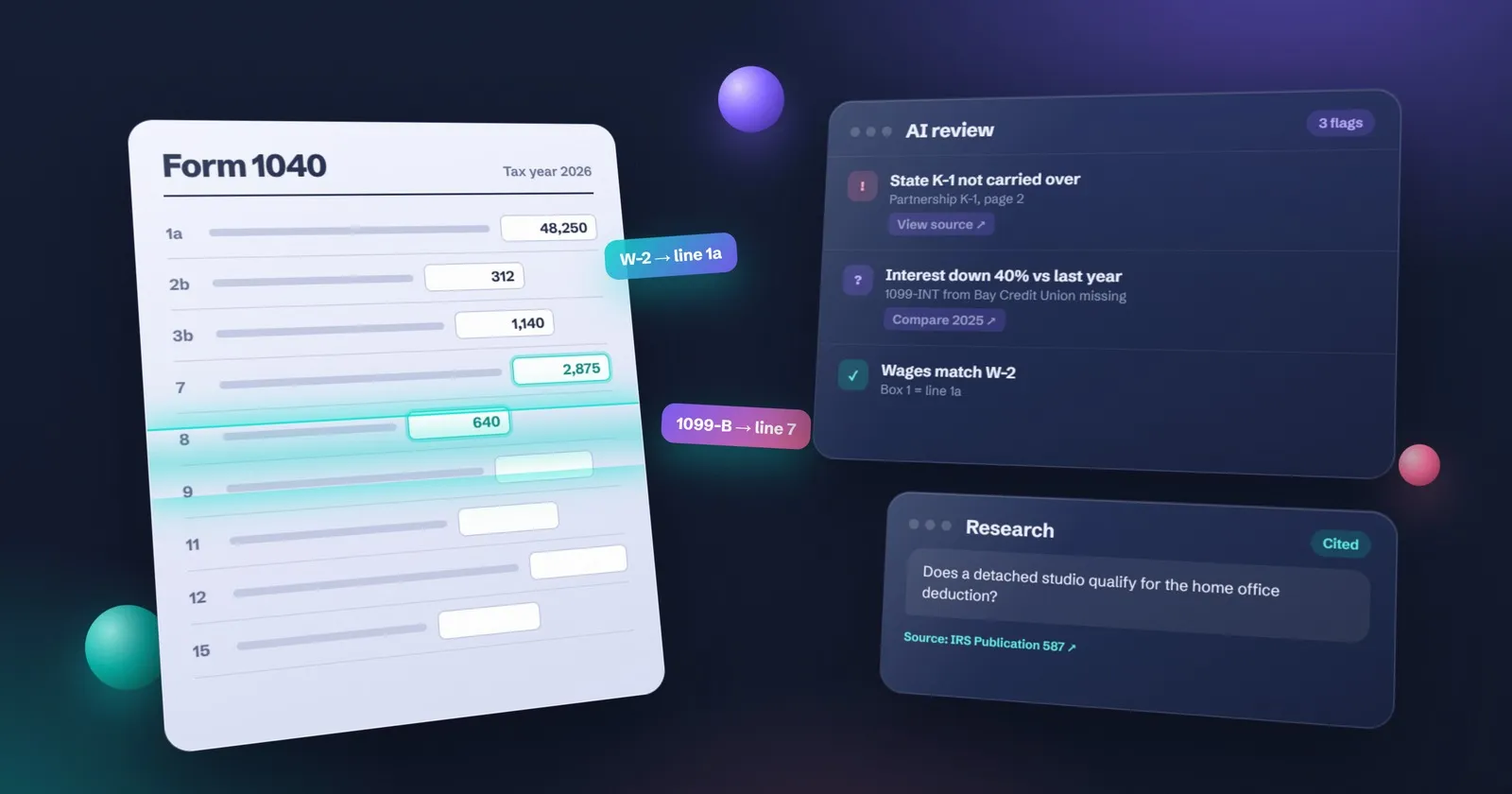
AI tax software for firms helps in three places: pulling numbers from client documents into a return, flagging review issues with links back to the source, and answering research questions with citations. It does not replace the preparer’s Circular 230 duty to check the work before filing.
If a tool can’t show you the source document behind a number, treat it as a draft generator, not a reviewer.
Three jobs: prep, review, research
Prep (extraction). The client uploads W-2s, 1099s, K-1s and brokerage statements. The tool reads them and fills the return in your tax software. This is where most of the hours are, and where most of the money is going.
Review. The tool compares the return with the source documents and with last year, then flags what looks wrong: a missing 1099-INT, a state K-1 not carried over, a number that changed by 40%. Good review tools link every flag to the page it came from.
Research and drafting. You ask a question (“Does this client’s home office qualify?”) and get an answer with citations. Some tools also draft the client email explaining it.
Cedar Tax’s problem, missed K-1 quirks, is a review problem. An extraction tool would type faster and miss the same things.
What Circular 230 and Section 7216 still require
Put this before any demo.
Circular 230 sets the conduct rules for people who practise before the IRS. Due diligence doesn’t move to the software. If AI fills a figure wrong and you sign, the error is yours. So every pilot needs a named reviewer and a rule for what they check.
Section 7216 covers how preparers use and disclose tax return information. There are criminal and civil penalties attached. Two practical rules follow:
- Read the vendor’s terms on training. Prefer tools that don’t train on your clients’ data, or let you switch it off.
- Never paste a full return into a consumer chatbot. If you use a general AI assistant for anything touching return information, check whether you need written client consent first.
IRS Publication 4557 covers the security side: who can log in, two-factor authentication, and what happens if a device is lost.
AI tax tools by job, with pricing
Checked on each vendor’s site the week of 10 November 2026. Many vendors only quote after a demo; that’s marked “quote”.
| Tool | Main job | Works with | Price on its site |
|---|---|---|---|
| Drake SmartExtract | Prep (extraction) | Drake Tax, Drake Tax Online | Free in beta through 31 Dec 2026; 2027 per-return pricing from $5 (1–9 returns) down to $1.50 (100+) |
| Juno | Prep and review | Drake, Lacerte, ProConnect, ProSeries, CCH Axcess | 5 free preparations; per-return price on request |
| Filed | Prep and review | Drake, CCH Axcess, Lacerte, ProConnect | Quote, based on number of taxpayers |
| Black Ore | Prep and review (complex returns) | UltraTax CS, Lacerte, CCH Axcess, Drake and others | From $60 per return for small and mid firms |
| Soraban | Intake, workpapers and delivery | UltraTax, Lacerte, Drake, CCH Axcess | Quote |
| Thomson Reuters SurePrep | Prep and review | Best fit for UltraTax and the TR stack | Quote |
| TaxGPT | Research, plus agents that work in tax software | Drake, ProConnect, UltraTax, CCH Axcess, Lacerte | Quote |
| Blue J | Research | Standalone | $1,498 a year per user; 7-day trial |
| Bizora | Research with citations and drafting | Standalone | Per user, monthly plans (check its site) |
| Grok Bot | General research chat and client emails | Standalone | Check current xAI pricing |
Notice the price spread. $1.50 a return for extraction inside Drake and $60 a return for a fuller autopilot are different products. Compare cost per return against the minutes it saves on your return mix, not the vendor’s.
Time-saved figures on vendor sites are the vendor’s own claims. We haven’t verified them.
Consumer AI tax products vs firm tools
If you’re filing your own return, this page isn’t for you. Consumer products such as TurboTax and H&R Block have their own AI help built in, and they’re designed for one household. Firm tools assume a preparer, a review step and professional tax software.
How to choose: a fit checklist
| Check | Why it matters |
|---|---|
| Works with your tax software | No integration means retyping, which defeats the point |
| Forms and states you file | Many tools skip some states or entity returns |
| Source links on every number | Your reviewer needs to check fast |
| Security report (SOC 2 or similar) | Pub 4557 and your own security plan |
| Data retention and training settings | Section 7216 and client trust |
| Per-return or per-user cost at your volume | 600 returns at $5 is not 600 at $60 |
| Exit: can you export your work? | You may switch next season |
Pilot plan for a five-person firm
Cedar Tax, in our example, runs the pilot in November, not March.
Week 1. Pick one return type: W-2 plus brokerage 1040s. Write the pass rule: every number traced to a source page, no more than two corrections per return. Check consent wording and switch off data training.
Week 2. Dual prep. Ten returns from last season (with consent) done both ways. Log minutes and every correction.
Week 3. One reviewer checks all ten AI-assisted returns against the source documents.
Week 4. Compare. If it saved 20 minutes a return with one correction each, it’s worth it on 600 returns. If corrections took longer than the typing would have, drop it. Write the decision down either way.
Where Grok Bot and general AI chat fit
General AI assistants don’t prepare or file returns. Nobody should suggest they do. Where they help is the writing and thinking around the return: drafting the “we still need your 1099-B” email, turning a call into a list of open questions, explaining a notice in plain words for a client.
Our main pick for that work is Grok Bot; the setup guide walks through it. ChatGPT, Claude and Microsoft Copilot do the same jobs. The comparison of the four helps you pick, and AI prompts for accountants has prompts that don’t need any client data.
For everyday office work beyond tax, see AI tools for accountants and practical AI uses for small businesses. For the bookkeeping side, AI bookkeeping covers transaction coding and reconciliation, which is a different job from the return.
When to wait until after tax season
Don’t start a pilot after mid-January. New software in February means training while clients are calling, and nobody does a careful dual prep at that point.
If you’ve missed the November window, run a research tool only, which doesn’t touch the return, and plan extraction or review for the next off-season. The tax season checklist shows where a pilot fits in the year.
One more thing. AI extraction is only as good as the documents it gets. If clients still email blurry phone photos, fix intake first: a client portal and a clear request list, as in stop chasing clients for documents.
More guides for tax and accounting firms are on the tax firms hub.
Questions
What is AI tax software?
It is software that uses AI to pull figures from client documents into a return, flag review issues with links to the source, or answer tax research questions with citations. It speeds up parts of the work. It does not sign the return or take on the preparer's responsibility.
What is the best AI tax software for CPAs?
It depends on the job and your tax software. Drake users can try SmartExtract inside Drake. Firms on Lacerte, ProConnect or CCH Axcess can look at Filed, Juno or Black Ore. For research, Blue J and Bizora give cited answers. Start with the job that costs you the most hours.
Is there free AI tax software?
Some tools offer free trials or free periods. Drake SmartExtract is free in beta through 31 December 2026, Juno offers five free preparations, and Blue J has a 7-day trial. Ongoing professional use is paid, usually per return or per user.
Can AI prepare a tax return without a human review?
Some tools can draft a full return, but a person must still review it. Under Circular 230 the practitioner is responsible for due diligence, and the signature on the return is a person's. Treat AI output as a draft that someone checks against the source documents.
What is the difference between AI tax software and AI bookkeeping?
AI bookkeeping codes transactions and reconciles accounts during the year. AI tax software works on the return: extracting figures from forms, reviewing the return and answering tax questions. They meet at year-end, when clean books feed the return.
Do I need Section 7216 consent to use AI on client returns?
Section 7216 limits how preparers use and disclose tax return information. Using a tool that acts as part of preparing the return is treated differently from using the data for other purposes, so read the IRS 7216 guidance and your vendor's terms, and get written consent when the use goes beyond preparation.
What should a small firm pilot first: prep, review or research?
Usually research or document extraction. Research tools are cheap to try and do not touch the return. Extraction saves the most typing hours. AI review is worth testing once you trust how the tool links its findings back to source documents.
Will AI replace tax preparers?
No for judgment, client advice and signing. Yes for some typing and first-pass checks. The likely change is fewer hours keying numbers and more hours reviewing and talking to clients.
Is AI tax software available in Canada, the UK and Australia?
Most tools in this guide are built around US forms and US tax software. Some research tools cover other countries. Check the supported forms and regions on each vendor's site before you book a demo.
This guide covers running the practice, not tax law. Rules differ by country and change often, so check anything technical with your local tax authority or professional body.